Translate

Thursday, 11 February 2016

Working of TCP and UDP

How TCP and UDP work?

A TCP connection is established via a three way handshake, which is a process of initiating and acknowledging a connection. Once the connection is established data transfer can begin. After transmission, the connection is terminated by closing of all established virtual circuits.

TCP PACKET FORMAT


TCP manages the flow of datagrams from the higher layers, as well as incoming datagrams from the IP layer. It has to ensure that priorities and security are respected. TCP must be capable of handling the termination of an application above it that was expecting incoming datagrams, as well as failures in the lower layers. TCP also must maintain a state table of all data streams in and out of the TCP layer. The isolation of these services in a separate layer enables applications to be designed without regard to flow control or message reliability. Without the TCP layer, each application would have to implement the services themselves, which is a waste of resources.

UDP uses a simple transmission model without implicit hand-shaking dialogues for guaranteeing reliability, ordering, or data integrity. Thus, UDP provides an unreliable service and datagrams may arrive out of order, appear duplicated, or go missing without notice. UDP assumes that error checking and correction is either not necessary or performed in the application, avoiding the overhead of such processing at the network interface level. Unlike TCP, UDP is compatible with packet broadcasts (sending to all on local network) and multicasting (send to all subscribers).


UDP PACKET FORMAT


Why UDP is faster than TCP?

The reason UDP is faster than TCP is because there is no form of flow control. No error checking,error correction, or acknowledgment is done by UDP.UDP is only concerned with speed. So when, the data sent over the Internet is affected by collisions, and errors will be present.

UDP packet's called as user datagrams with 8 bytes header. A format of user datagrams is shown in figur 3. In the user datagrams first 8 bytes contains header information and the remaining bytes contains data.

Different Applications of TCP and UDP

Web browsing, email and file transfer are common applications that make use of TCP. 
TCP is used to control segment size, rate of data exchange, flow control and network congestion.
TCP is preferred where error correction facilities are required at network interface level. 
UDP is largely used by time sensitive applications as well as by servers that answer small queries from huge number of clients.
UDP is compatible with packet broadcast - sending to all on a network and multicasting  sending to all subscribers. 
UDP is commonly used in Domain Name System, Voice over IP, Trivial File Transfer Protocol and online games.

Need of TCP and UDP depends upon how data is required by sender
  • Use HTTP over TCP for making occasional, client-initiated stateless queries when it's OK to have an occasional delay.
  • Use persistent plain TCP sockets if both client and server independently send packets but an occasional delay is OK (e.g. Online Poker, many MMOs).
  • Use UDP if both client and server may independently send packets and occasional lag is not OK 

TCP VS UDP

Layer 4 of the OSI model called Transport layer, is used for transmitting data from source to destination.
On basis of their transmission of data and connections we decide it to be TCP or UDP.

Both TCP and UDP Protocols are used for sending bits of data known as packets.They are build on Top of Internet  Protocol.

TCP (Transmission Control Protocol) as the name states it is connection oriented protocol. In TCP, there is an open connection established between Sender and Receiver. After TCP session established bi-directional data flows.

Whereas in UDP (User Datagram Protocol) it is connectionless Internet Protocol. It does not require open connection to be established between Sender and Receiver.

TCP and UDP have common header fields (source and destination port) and checksum.


Differences in Data Transfer Features
TCP ensures a reliable and ordered delivery of a stream of bytes from user to server or vice versa. UDP is not dedicated to end to end connections and communication does not check readiness of receiver.

Reliability
TCP is more reliable since it manages message acknowledgment and retransmissions in case of lost parts. Thus there is absolutely no missing data. UDP does not ensure that communication has reached receiver since concepts of acknowledgment, time out and retransmission are not present.

Ordering
TCP transmissions are sent in a sequence and they are received in the same sequence. In the event of data segments arriving in wrong order, TCP reorders and delivers application. In the case of UDP, sent message sequence may not be maintained when it reaches receiving application. There is absolutely no way of predicting the order in which message will be received.

Connection
TCP is a heavy weight connection requiring three packets for a socket connection and handles congestion control and reliability. UDP is a lightweight transport layer designed atop an IP. There are no tracking connections or ordering of messages.

Method of transfer
TCP reads data as a byte stream and message is transmitted to segment boundaries. UDP messages are packets which are sent individually and on arrival are checked for their integrity. Packets have defined boundaries while data stream has none.

Wednesday, 10 February 2016

Firewall Technology 3 (STATEFUL FILTERING)

Stateful Filtering is the Firewall technique used for tracking the return traffic of  host which is initiated from internal network.

  • Stateful Filtering allows return traffic by creating state table which maintains the data of traffic like Source and Destination IP Address, Port numbers, TCP Protocol.
  • Also this process does not require CPU utilization, although it consumes memory for building state table. Return Traffic which was initiated from internal network is allowed by default in Stateful Filtering through State Table entries.


STATEFUL FILTERING

A stateless firewall treats each network frame or packet individually. Such packet filter operate at the OSI Network Layer (layer 3) and function more efficiently because they only look at the header part of a packet.

Working of Stateful Firewall
A stateful firewall keeps track of the state of network connections (such as TCP streams or UDP communication) and is able to hold significant attributes of each connection in memory. These attributes are collectively known as the state of the connection, and may include such details as the IP addresses and ports involved in the connection and the sequence numbers of the packets traversing the connection. Stateful inspection monitors incoming and outgoing packets over time, as well as the state of the connection, and stores the data in dynamic state tables. 

The most CPU intensive checking is performed at the time of setup of the connection. Entries are created only for TCP connections or UDP streams that satisfy a defined security policy. After that, all packets (for that session) are processed rapidly because it is simple and fast to determine whether it belongs to an existing, pre-screened session. Packets associated with these sessions are permitted to pass through the firewall. Sessions that do not match any policy are denied, as packets that do not match an existing table entry.


In order to prevent the state table from filling up, sessions will time out if no traffic has passed for a certain period. These stale connections are removed from the state table. Many applications therefore send keepalive messages periodically in order to stop a firewall from dropping the connection during periods of no user-activity, though some firewalls can be instructed to send these messages for applications.


Stateful Firewall works on TCP connections with SYN, SYN-ACK and ACK packets. SYN is used to open the connections in Firewall. SYN-ACK will be the response given by the server for the service desired and ACK is the final acknowledgement or established connection. These TCP Connections are used for tracking the established Connections. Simultaneously, the firewall drops all packets which are not associated with an existing connection recorded in its state table, thereby dropping unknown traffic coming from unsolicited device

Working OF STATEFUL FILTERING


The example of a network operation that may fail with a stateless firewall is the File Transfer Protocol (FTP). By design, such protocols need to be able to open connections to arbitrary high ports to function properly. Since a stateless firewall has no way of knowing that the packet destined to the protected network (to some host's destination port 4970, for example) is part of a legitimate FTP session, it will drop the packet. Stateful firewalls with application inspection solve this problem by maintaining a table of open connections, inspecting the payload of some packets and intelligently associating new connection requests with existing legitimate connections.

Monday, 8 February 2016

Firewall Technology 2 (PROXY SERVER)

PROXY SERVER

As the name states proxy server, here the server is being reached by using Proxy. The connection established by proxy on behalf of Client.

CLIENT-------------------------------------------PROXY-----------------------------------------SERVER

Here, Client when has to access any traffic of Internet, it sends request to proxy initially, proxy manages the traffic and sends it to dedicated server on behalf of client. Proxy acts as server for client and Client for the destination Server. All the tcp traffics are managed by Proxy. 


A proxy server is a server that sits between a client application, such as a Web browser, and a real server. It intercepts all requests to the real server to see if it can fulfill the requests itself. If not, it forwards the request to the real server.

Proxy Servers add security to the content. It helps in application level filtering of the data send from client to Server. Proxy Servers are slow henceforth, as it adds extra filtering to the content, also helping in securing the content.

Proxy Servers are of 3 Types

  • Application Level Proxy- Application level proxy is also known as Application Gateway. Whereas, an application gateway is an application program that runs on a firewall system between two networks. When a client program establishes a connection to a destination service, it connects to an application gateway, or proxy. The client then negotiates with the proxy server in order to communicate with the destination service. In effect, the proxy establishes the connection with the destination behind the firewall and acts on behalf of the client, hiding and protecting individual computers on the network behind the firewall. This creates two connections: one between the client and the proxy server and one between the proxy server and the destination. Once connected, the proxy makes all packet-forwarding decisions. Since all communication is conducted through the proxy server, computers behind the firewall are protected. While this is considered as most secure method, but application gateway require more memory and processor requirements.
  • Web Proxy-A common proxy application is a caching Web proxy. This provides a nearby cache of Web pages and files available on remote Web servers, allowing local network clients to access them more quickly or reliably.When it receives a request for a Web resource (specified by a URL), a caching proxy looks for the resulting URL in its local cache. If found, it returns the document immediately. Otherwise it fetches it from the remote server, returns it to the requester and saves a copy in the cache.Cache usually uses expiry algorithm to remove documents from cache, according to their size, age and access history. Algorithms like LRU (Least Recent Used) and LFU (Least Frequently used) are implemented.Web proxies can also filter the content of Web pages served. Some censorware applications - which attempt to block offensive Web content - are implemented as Web proxies.
  • Email Proxy-Email proxy uses SMTP (Simple Mail Transfer Proxy) Agents to transfer mails to other agents. SMTP proxies do not store messages like a mail transfer agent (MTA) does, they can reject SMTP connections or message content in real-time. Certain SMTP proxies implement TCP connection management (otherwise known as flow control), which can help to reduce damage to downstream mail servers resulting from spikes in TCP traffic from malicious SMTP clients. TCP connection management in the context of SMTP typically involves bandwidth throttling and/or introducing delays in SMTP command responses. When slowed down, certain malicious sources of SMTP traffic such as spam bots tend to give up rather than continuing to deliver a full email message.

Wednesday, 3 February 2016

Firewall Technology 1 (Packet Filtering)

Firewall has different functioning based on its Technology. Majorly they can be classified into 3 technology.

  • Packet Filtering.
  • Proxy Server.
  • Stateful Filtering.
Packet Filtering
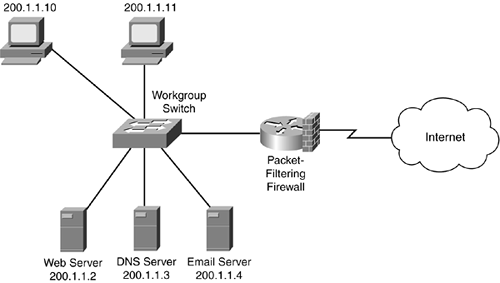
-This technology of Firewall is  process of passing packet  based on Source and Destination IP  Address, Ports and protocols.
-In this technology the passing or blocking of packet are decided on firewalls interface inbound  and outbound direction.
-Access-list applied on the inbound for packets coming from outside network and outbound for  packets going out from Firewall.
-Packet level inspection takes place, where each L3 packets are filtered based on Source and  Destination Address before passing in and out of Firewall.

In a software firewall, packet filtering is done by a program called a packet filter. The packet filter examines the header of each packet based on a specific set of rules, and on that basis, decides to prevent it from passing (called DROP) or allow it to pass (called ACCEPT)

Packet Filtering


There are three ways in which a packet filter can be configured, once the set of filtering rules has been defined. In the first method, the filter accepts only those packets that it is certain are safe, dropping all others. 
This is the most secure mode, but it can cause inconvenience if legitimate packets are inadvertently dropped. In the second method, the filter drops only the packets that it is certain are unsafe, accepting all others. This mode is the least secure, but is causes less inconvenience, particularly in casual Web browsing. In the third method, if the filter encounters a packet for which its rules do not provide instructions, that packet can be quarantined, or the user can be specifically queried concerning what should be done with it. This can be inconvenient if it causes numerous dialog boxes to appear, for example, during Web browsing.

Tuesday, 2 February 2016

Demilitarized Zone


In computer networks, a DMZ (demilitarized zone) is a physical or logical sub-network that separates an internal local area network (LAN) from other untrusted networks, usually the Internet. External-facing servers, resources and services are located in the DMZ so they are accessible from the Internet but the rest of the internal LAN remains unreachable. This provides an additional layer of security to the LAN as it restricts the ability of hackers to directly access internal servers and data via the Internet.

Firewall creates Segmentation in Network based on Security requirements. It divides the network into Private (Internal Trusted) Network and Public (External Untrusted) Network.

Further if Internal network wants to host a server or resource, Firewall helps them in hosting it by creating Demilitarized Zone.

DMZ can be used for hosting any server and services of dns, web, https, ftp can be provided by it.

DMZ (Demilitarized Zone)


There are ways to design DMZ -single or Dual DMZ Firewalls.
A single firewall with at least three network interfaces can be used to create a network architecture containing a DMZ. The external network is formed from the ISP to the firewall on the first network interface, the internal network is formed from the second network interface, and the DMZ is formed from the third network interface.

The second approach of using two Firewall to create DMZ is most secure approach. Here the first firewall also called the perimeter firewall is configured to allow traffic destined to the DMZ only. The second or internal firewall only allows traffic from the DMZ to the internal network. This is considered more secure since two devices would need to be compromised before an attacker could access the internal LAN. As a DMZ segments a network, security controls can be tuned specifically for each segment. For example a network intrusion detection and prevention system located in a DMZ that only contains as Web server can block all traffic except HTTP and HTTPS requests on ports 80 and 443.

Monday, 1 February 2016

Default Policy of Firewall

As we all know Firewall create Segmentation in network which divides the network into 2 region
1) Private Network ( Trusted Network) Region.
2) Public Network  ( Untrusted Network) Region.


Further the Firewall has a Default policy which sets up an important rule for this network Regions.


Default Policy of Firewall states that - Firewall allows traffic from trusted Region to pass through Untrusted Region.  

Also its default policy denies the traffic from untrusted network to the trusted Network. 


ACLs need to be applied at the outside interface for allowing sourced traffic from outside network coming to Firewall.
It wont allow by default, only if the orignal traffic is sourced from untrusted or outside network.


Also it takes care of Return Traffic coming through Firewall.
Firewall maintains a state table, which helps it maintaining ip address, port number thus allowing return traffic which was initially sourced from inside network.


FIREWALL DEFAULT POLICY 

(Allowing traffic from inside nwtwork to Internet)